Generate Housekeeping Service Requests Individually for Component Rooms
Stay is enhanced to create Stayover and Checkout service requests individually for each component room that is occupied as part of a virtual suite. For example, if a suite room S101 consists of two component rooms K102, and K103, the Stayover and Checkout service requests will now be created individually for the rooms K102 and K103.
Previously, all the service requests were created for the suite room and not for the component rooms.
The service requests will continue to be captured in the following Legacy reports as per the existing functionality:
-
Service Request Time
-
Service Requests
Permissions
The following new permissions are introduced to enable users to create service requests for component rooms:
-
Stay_ReadHKVirtualSuiteRooms: Users with this permission can view the Virtual Suite Rooms section in the Housekeeping Setup screen. This section is not visible to users without this permission. This permission is added by default to all the system defined roles that have the existing ReadHouskeeping permission.
-
Stay_WriteHKVirtualSuiteRooms: Users with this permission can enable or disable the Create Services for Component Rooms flag in the Virtual Suite Rooms section. This permission is added by default to all the system defined roles that have the existing WriteHouskeeping permission.
To support this enhancement, the following changes have been made:
-
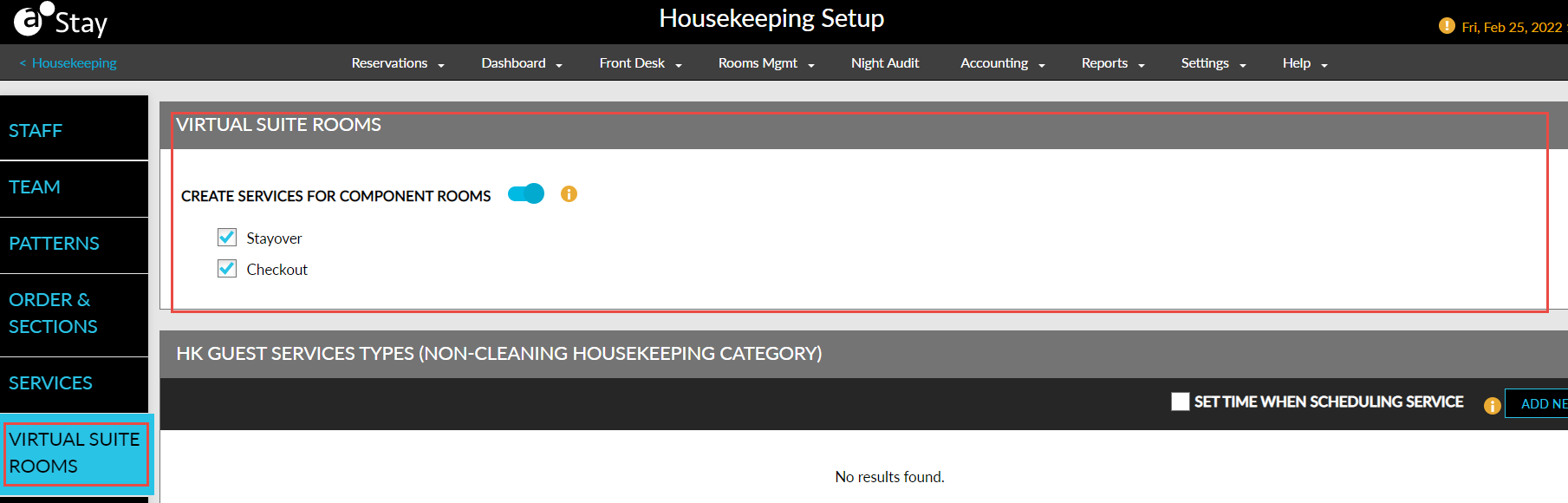
A new tab, Virtual Suite Rooms, is added to the Housekeeping Setup screen that displays the new flag, Create Services for Component Rooms. When enabled, the following new options are selected by default:
-
Stayover: This checkbox is disabled when the Create Services for Component Rooms flag is disabled. When enabled, all the stay over service requests for the day are created for each individual component room instead of the virtual suite, during date roll.
-
Checkout: This checkbox is disabled when the Create Services for Component Rooms flag is disabled. When enabled, all the checkout service requests for the day are created for each individual component room instead of the virtual suite, during date roll.
-
-
The service requests created for the individual component rooms of a suite are displayed as separate line entries in the Service Requests section of the reservation (Reservation Summary ➜ SVC ➜ Service Requests).
-
The service requests are also displayed in the following screens:
-
Housekeeping ➜ Home ➜ Assigned Services
-
Housekeeping ➜ Assign ➜ Unassigned Service Requests
-
Housekeeping ➜ Print ➜ Assigned Services
-
Housekeeping ➜ Print ➜ Assigned Services ➜ Print
-
-